
Getting Started with Qdrant: Your First Vector Database in less than 10 Minutes
Ever wondered how Spotify knows exactly what song you’ll love next? Or how Google finds the perfect image when you search “cute cats wearing hats”? Welcome to the world of vector databases - and today, we’re diving into Qdrant, the speed demon of the vector database world.
What the Heck is a Vector Database Anyway?
Think of a traditional database like a filing cabinet. You store information in neat rows and columns, and when you want something, you ask for it exactly: “Give me all customers named John.” Simple, right?
But what if you wanted to ask: “Give me all the things that are similar to this thing I’m showing you?” That’s where vector databases shine. They’re like having a super-smart librarian who doesn’t just organize books alphabetically, but actually understands what each book is about and can recommend similar ones.
Qdrant (pronounced “quadrant”) is one of these smart librarians, but for your data. It turns your information into mathematical vectors (think of them as coordinates in a multi-dimensional space) and can find similar items lightning-fast.
Why Qdrant Will Make You Feel Like The Flash ⚡
 Here’s the cool part: Qdrant is ridiculously fast. We’re talking about 24 milliseconds to search through millions of vectors. To put that in perspective, it takes you about 300–400 milliseconds just to blink!
What makes it so speedy?
- It’s built with Rust - Think of Rust as the Formula 1 car of programming languages. Fast, efficient, and doesn’t crash.
- HNSW Indexing - This fancy acronym basically means it doesn’t search through every single item. Instead, it creates a smart roadmap that helps it jump directly to the most similar results.( we can discuss this later in details)
- Vector Quantization - It compresses your data without losing the important bits, like having a magic bag that fits everything but stays lightweight.
- Parallel Processing - It’s like having multiple workers doing the job simultaneously instead of one person doing everything.
And the cherry on top? It’s completely free for up to 1 million vectors. That’s like getting a Ferrari with free gas for your first 100,000 miles!
Two Roads Diverged: Docker vs Python Setup 🛣️
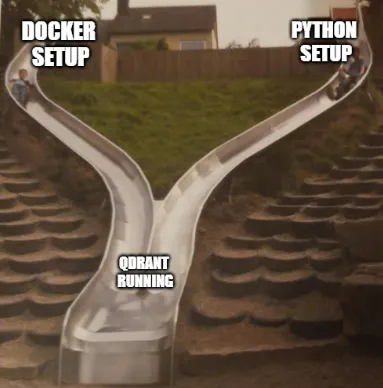 You have two main ways to get Qdrant running:
- Docker Route: Like getting a pre-built, furnished apartment. Everything’s ready to go.
- Python Route: Like building your own cozy workspace. More control, perfect for development.
Let’s explore both!
The Docker Highway (Recommended for Most Humans)
What You’ll Need:
- Docker installed (if you don’t have it, grab it from docker.com)
- 5 minutes of your time
Step 1: Get Qdrant
docker pull qdrant/qdrantThis downloads Qdrant like downloading a movie from Netflix - but way faster.
Step 2: Start Your Vector Database
docker run -p 6333:6333 -p 6334:6334 \
-v "$(pwd)/qdrant_storage:/qdrant/storage:z" \
qdrant/qdrant
Don’t let this command scare you! Here’s what it does:
- Opens doors 6333 and 6334 for communication
- Creates a folder to save your data (so you don’t lose everything when you restart)
Step 3: Check if it’s alive
Open your browser and go to: http://localhost:6333/dashboard
Qdrant dashboard interface
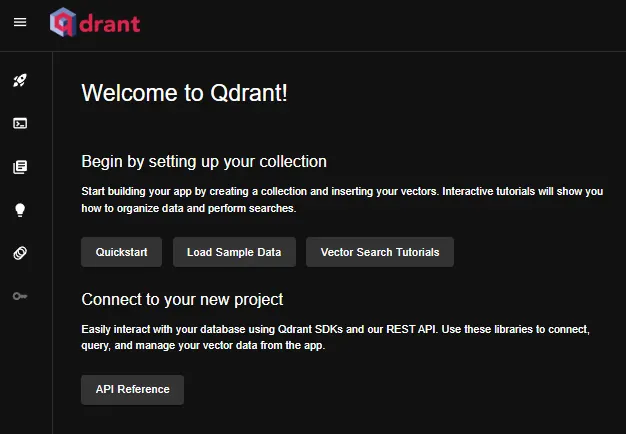 If you see a sleek dashboard, congratulations! You’ve just deployed your first vector database. Feel free to do a little victory dance. 💃
The Python Path (For the Code Lovers) 🐍
What You’ll Need:
- Python 3.7+ (check with
python --version) - 2 minutes of your time
Step 1: Install the Magic
pip install qdrant-clientStep 2: Create Your Database
from qdrant_client import QdrantClient

# Option 1: Keep everything in memory (like RAM)
client = QdrantClient(location=":memory:")
# Option 2: Save to your computer
client = QdrantClient(path="./my_vector_db")
That’s it! No Docker, no complications. Just pure Python simplicity.
Your First Vector Database: A City Similarity Finder 🌆
Let’s build something cool! We’ll create a system that finds similar cities based on some mysterious characteristics (represented as vectors).
Step 1: Connect to Your Database
from qdrant_client import QdrantClient

# If you used Docker:
client = QdrantClient(url="http://localhost:6333")
# If you used the Python route:
# client = QdrantClient(path="./my_vector_db")
Step 2: Create Your First Collection
Think of a collection like a folder where you’ll store similar types of data.
from qdrant_client.models import Distance, VectorParams

client.create_collection(
  collection_name="world_cities",
  vectors_config=VectorParams(size=4, distance=Distance.DOT),
)
What just happened?
- We created a “world_cities” collection
- Each vector will have 4 dimensions (imagine 4 characteristics of each city)
- We’ll use DOT product to measure similarity (there are other options, but this works great)
Step 3: Add Some Cities
from qdrant_client.models import PointStruct

cities_data = [
  PointStruct(id=1, vector=[0.05, 0.61, 0.76, 0.74], payload={"city": "Berlin", "country": "Germany"}),
  PointStruct(id=2, vector=[0.19, 0.81, 0.75, 0.11], payload={"city": "London", "country": "UK"}),
  PointStruct(id=3, vector=[0.36, 0.55, 0.47, 0.94], payload={"city": "Moscow", "country": "Russia"}),
  PointStruct(id=4, vector=[0.18, 0.01, 0.85, 0.80], payload={"city": "New York", "country": "USA"}),
  PointStruct(id=5, vector=[0.24, 0.18, 0.22, 0.44], payload={"city": "Beijing", "country": "China"}),
  PointStruct(id=6, vector=[0.35, 0.08, 0.11, 0.44], payload={"city": "Mumbai", "country": "India"}),
]
operation_info = client.upsert(
  collection_name="world_cities",
  wait=True,
  points=cities_data,
)
print(f"Success! Operation status: {operation_info.status}")
What are these mysterious numbers? In a real application, these vectors might represent things like:
- Climate data
- Economic indicators
- Cultural similarity scores
- Geographic features
Step 4: Find Similar Cities
Now for the magic moment! Let’s find cities similar to some mystery location:
# Our mystery city vector
mystery_city = [0.2, 0.1, 0.9, 0.7]

search_result = client.query_points(
  collection_name="world_cities",
  query=mystery_city,
  with_payload=True,
  limit=3
).points
print("Cities most similar to our mystery location:")
for point in search_result:
  print(f"🏙️ {point.payload['city']}, {point.payload['country']} (similarity: {point.score:.3f})")
Expected Output:
Cities most similar to our mystery location:
🏙️ New York, USA (similarity: 1.362)
🏙️ Berlin, Germany (similarity: 1.273)
🏙️ Moscow, Russia (similarity: 1.208)
Cool, right? Qdrant just found the most similar cities in milliseconds!
Step 5: Add Some Filtering Magic
What if we want to find similar cities, but only in specific countries?
from qdrant_client.models import Filter, FieldCondition, MatchValue

# Find similar cities, but only in the UK
uk_search = client.query_points(
  collection_name="world_cities",
  query=mystery_city,
  query_filter=Filter(
    must=[FieldCondition(key="country", match=MatchValue(value="UK"))]
  ),
  with_payload=True,
  limit=3,
).points
print("Similar cities in the UK:")
for point in uk_search:
  print(f"🇬🇧 {point.payload['city']} (similarity: {point.score:.3f})")
Checking Your Handiwork 🔍
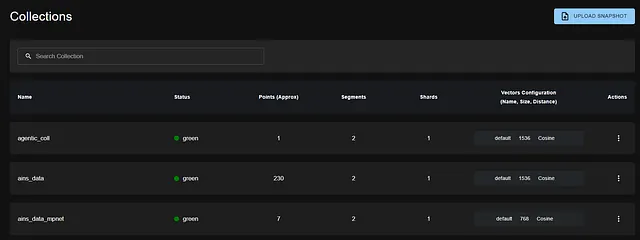
- Visual Dashboard
Visit http://localhost:6333/dashboard in your browser. You’ll see a beautiful interface where you can:
- Browse your collections
- See how much data you have
- Monitor performance
- API Check
Want to feel like a hacker? Try this in your terminal:
curl http://localhost:6333/collectionsYou’ll get a JSON response showing all your collections. Very Matrix-y!
Real-World Applications (Where This Actually Matters)
Now that you’ve got the basics, here’s where vector databases like Qdrant shine in the real world:
- 🛒 E-commerce Recommendations
“Customers who bought this item also viewed…” - that’s Qdrant finding similar products.
- 🔍 Semantic Search
Instead of searching for exact keywords, you can search by meaning. Ask for “fast cars” and get results for “speedy vehicles.”
- 😊 Social Media Content
Instagram uses similar tech to show you posts you’ll actually want to see.
- 📝 Document Similarity
Find similar legal documents, research papers, or even duplicate customer support tickets.
- 🎵 Music Discovery
Spotify’s “Discover Weekly” uses vector similarity to find new songs you’ll love.
Taking It to the Next Level
- Want More Data? You can upload thousands, millions, or even billions of vectors. Qdrant handles it all with grace.
- Need Real Production Power? Check out Qdrant Cloud for a managed service that handles scaling, backups, and all the boring infrastructure stuff.
Join the Community
- Discord for quick questions
- GitHub for the source code
- Documentation for deep dives
Common Gotchas (Learn from My Mistakes!) ⚠️
- Vector Dimensions Must Match: If you create a collection with 4D vectors, all your vectors must be 4D. No exceptions!
- Docker Persistence: Without the
-vflag in Docker, your data disappears when you restart. Don’t be like me on my first try! - Memory vs Disk: The
:memory:option is great for testing but everything disappears when you stop the program. - Distance Metrics Matter: DOT, Cosine, and Euclidean work differently. Choose based on your data type.
What’s Next?
You now have a production-ready vector database running! Here are some fun projects to try:
- Build a Recipe Recommender: Find similar recipes based on ingredients
- Create a Movie Suggestion Engine: “If you liked this, you’ll love that”
- Make a Smart Document Search: Upload PDFs and search by concepts, not just keywords
- Build a Color Palette Finder: Find colors that work well together
Wrapping Up
Congratulations! You’ve just:
- ✅ Set up your first vector database
- ✅ Created a collection and added data
- ✅ Performed lightning-fast similarity searches
- ✅ Applied filters like a pro
- ✅ Joined the ranks of vector database wizards
Vector databases might seem like magic, but they’re really just very smart mathematics working incredibly fast. And now you have that power at your fingertips.
The world of AI and machine learning is moving towards understanding meaning and similarity, not just exact matches. With Qdrant in your toolkit, you’re ready to build the next generation of intelligent applications.
Happy coding, and may your vectors always find their perfect matches! 🎯
Found this helpful? Give it a clap and follow for more beginner-friendly AI tutorials. Got questions? Drop them in the comments - I love helping fellow developers on their journey!
References
- Qdrant Documentation
- Python Client Examples
- Interactive Tutorials
- REST API Reference
- Qdrant Cloud Sign Up
- Subscribe to the Qdrant Newsletter

(END)